
PLC Communication কী এবং কেন দরকার? PLC Communication হলো এক বা একাধিক ডিভাইসের মধ্যে ডাটা আদান-প্রদান করার প্রক্রিয়া।
কেন দরকার?
-
PLC কে কেবল logic execute করতে হয় না; তাকে ডেটা পাঠাতে ও নিতে হয় যন্ত্র বা display এর সাথে।
উদাহরণ
-
PLC ↔ HMI (Operator display)
-
PLC ↔ VFD / Servo (Motor control)
-
PLC ↔ Sensor / Remote I/O
-
PLC Communication সুবিধা
-
Realtime data monitoring
-
Remote control of machines
-
Multiple devices একসাথে work করা
Communication এর ধরন
PLC communication বিভিন্ন ধরনের হতে পারে:
1. Serial Communication
-
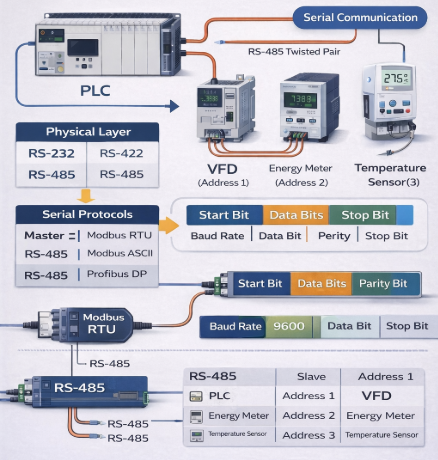
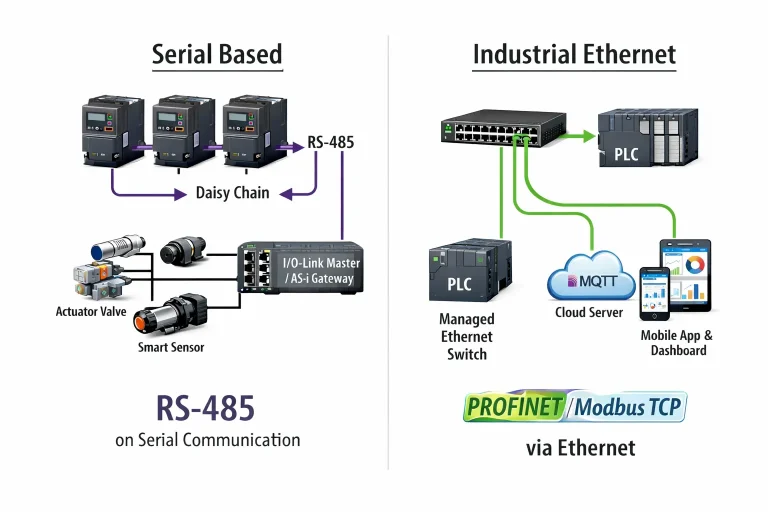
RS232 / RS485
-
Protocol: Modbus RTU
-
Short distance, 1 বা একাধিক device
2. Ethernet Communication
-
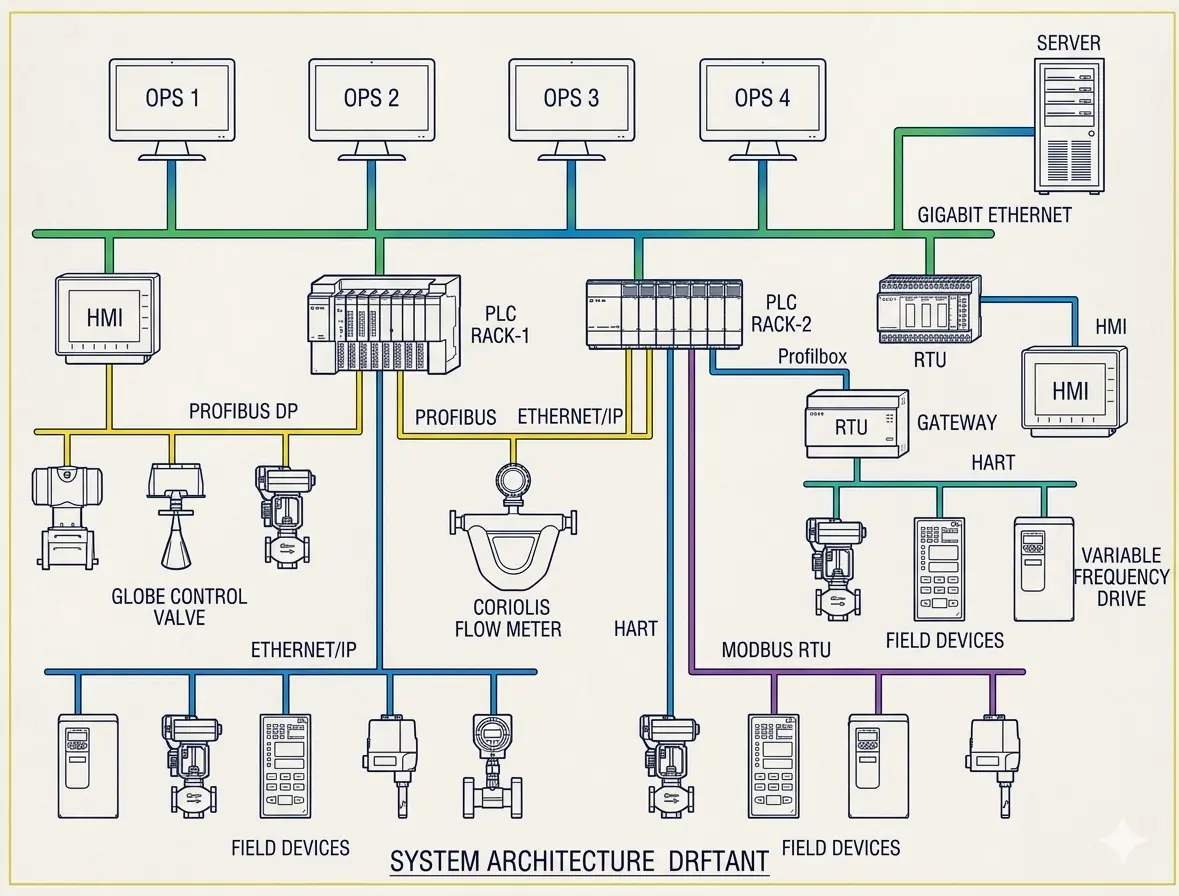
TCP/IP, Modbus TCP, Profinet
-
Long distance, multiple devices, fast
3. Fieldbus
-
Profibus, DeviceNet, CANopen
-
Industrial automation network
-
Multiple devices centralized communication
Master & Slave Concept
-
Master: ডিভাইস যা command পাঠায় (সাধারণত PLC)
-
Slave: ডিভাইস যা response দেয় (sensor, VFD, HMI)
Example
Master শুধু command দেয়, slave সেই অনুযায়ী ডাটা পাঠায়।
Addressing
-
প্রতিটি slave device এ unique ID / address থাকে
-
Master এই ID ব্যবহার করে command পাঠায়
Example:
Data Types
PLC communication এ মূলত:
| Data Type | Use Case |
|---|---|
| Coil / Bit | On/Off signals (Start/Stop) |
| Register / Word | Analog values (temperature, speed, pressure) |
Communication Setup Hardware
-
Serial cable (RS232/RS485) বা Ethernet cable
-
Connect PLC ↔ Slave device
-
RS485 এর ক্ষেত্রে termination resistor ব্যবহার করা প্রয়োজন
Note: Cables সঠিকভাবে connect না হলে communication fail হবে।
Programming
TIA Portal / Siemens Example:
-
Insert communication block (Modbus Read/Write, Ethernet send/receive)
-
Set:
-
Slave Address
-
Data Type (Bit/Register)
-
Number of Points / Registers
-
Start Address
-
-
Map PLC memory to Slave registers
Example:
-
Read temperature from VFD:
HMI Integration
-
HMI ↔ PLC connection setup
-
Map HMI display to PLC memory (Coils/Register)
-
Test: Start/Stop, Read values
Tip: HMI operator panel এ real-time data দেখানো যাবে।
Testing & Troubleshooting
-
Check cable, protocol, slave address
-
Use PLC monitor / online diagnostics
-
Observe HMI / device response
Common Issue:
-
Wrong slave address → no response
-
Wrong protocol → garbage data
-
Cable loose → communication fail
Practical Example (Modbus RTU)
Scenario: PLC control 1 VFD + 1 Temperature Sensor
| Device | Type | Slave ID |
|---|---|---|
| VFD | Motor | 1 |
| Temp Sensor | Analog | 2 |
PLC program
-
Read speed from VFD register 100 → DBW0
-
Read temperature from Sensor register 200 → DBW2
-
Start/Stop VFD → Coil 0